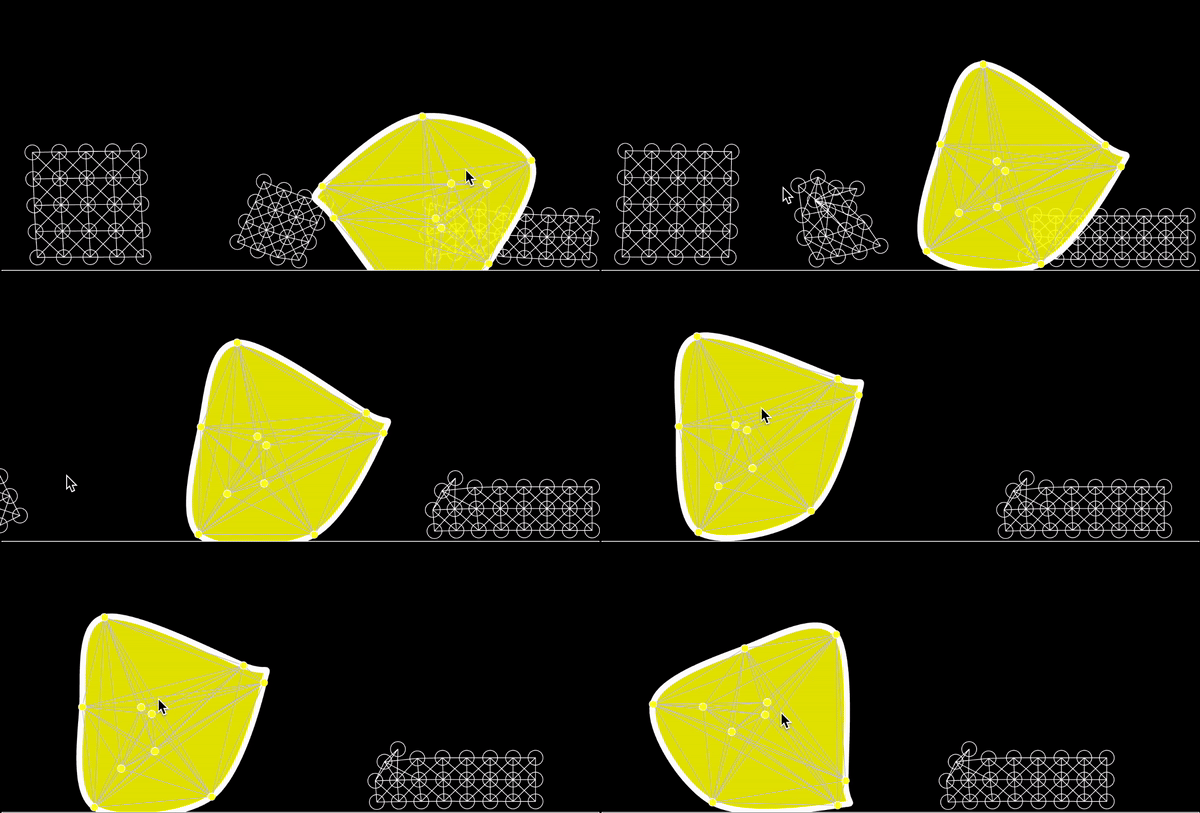
Hey there! Welcome (back)!
We’ve reached the final chapter of our physics engine explorations. In this last part, we’ll dive into:
- Writing code for a Custom-Shaped Soft Body
- Drawing the edges of the custom shape using a Convex Hull Algorithm
That’s it! We’ll keep this section short and straightforward. You can find the final code here -> p5js editor sketch ; and at the bottom of the article.
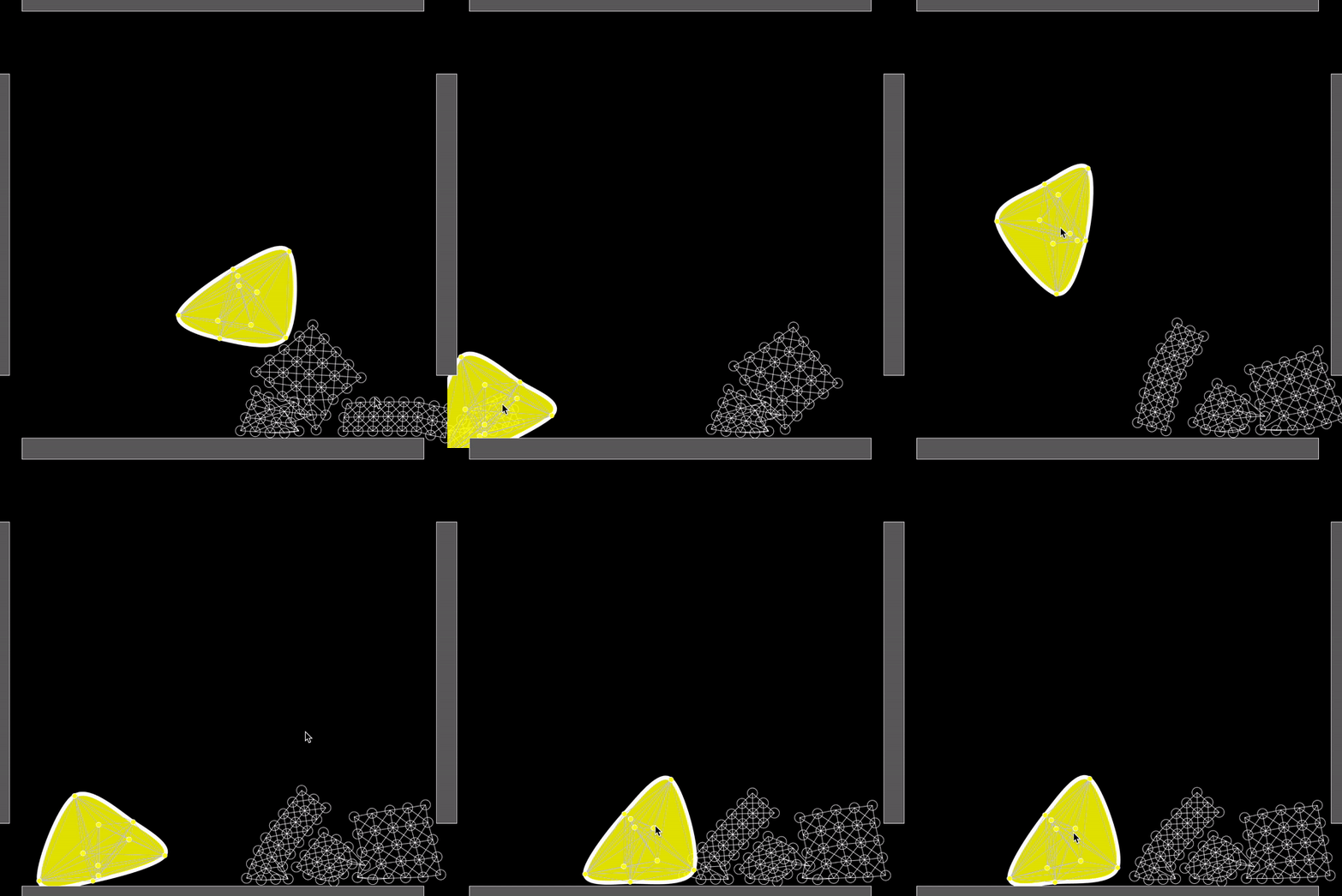
A Custom-Shaped Soft Body
To begin with we’ll depart from our previous example. Instead of using the available method .mesh from the Composite class from matterjs, we will write additional code to create our custom shape structure. This will allow us to create a structure that, instead of a rectangular mesh array, will be composed of mass points randomly distributed in an amorphous cluster of points.
For this we will focus mainly on creating two functions. One for creating the amorphous cluster, which we will call amorphous Soft Body; and the other one for displaying the shape. As this will require an additional algorithm I’ll explain that in detail in the next section.
Ok, to start with, let’s call our function createAmorphousSoftBody, and remembering our other SoftBody functions we will actually use a set of similar parameters to declare this function, such as the x and y coordinates of the shape, number of particles, area radius of the shape, radius of each mass point, and the particle-options.
Our createAmorphousSoftBody should return an object amorphousBody which will be stored as a global accessible variable declared at the top of our script -> let amorphousSoftBody;
Inside the createAmorphousSoftBody function we use Composite as an instance from the Composite class inside matterjs. This Composite class will help us to create the cluster of mass points and their respective constraints or springs.
Note here that in the previous example we used the method mesh which does not require the declaration of constraints, but creates already a matrix or grid of interconnecting springs joining the mass points in the mesh.
That explained, inside the createAmorphousSoftBody function, we will focus only adding particles (or mass points) and constraints (or springs).
In order to create the particles we will use a recursive for loop which will cycle N times equal to the numParticles parameter. Inside this for loop, we will randomize the position of each particle in the Soft Body or Cluster, by randomizing the value of the rotation angle from the center of the cluster to the center of the particle or mass point, as well as the relative x and y coordinates from the same particle:
`` ... inside createAmorphousSoftBody // Create particles randomly within the defined area let particles = []; for (let i = 0; i < numParticles; i++) { let angle = random(0, TWO_PI); // Random angle let distance = random(0, areaRadius*4); // Random distance within the area radius let x = xx + cos(angle) distance; let y = yy + sin(angle) distance; ``
This will give us the x and y coordinates needed to declare our particles.
`` let particle = Bodies.circle(x, y, radius, particleOptions); particles.push(particle); Composite.add(amorphousBody, particle); } // closing the for loop ``
Next we connect the particles with the constraints (springs) which will keep them in place relative to the initial shape or distribution of the mass points. Here we only need to iterate through the already added particles in the previous for loop. For that we will use two nested for loops to be able to iterate through the points twice and extract their coordinates. We access the points twice to recursively calculate the distances from each point to all other points. These distances will be useful to decide about whether a point is connected to another or not. We could alternatively use other algorithms like k-d Tree / Quadtrees. But for our approach this works.
And actually we will exclude the distance threshold condition as this will make the Soft Body very unstructured and unstable. Feel free to uncomment and try out.
Well, the most important part is that we create our constraint by connecting the required points and this is done via the class Constraint from matterjs and its method .create(). This will basically add an invisible spring joint between the given mass points or bodies (bodyA & bodyB). Finally we add the constraint to the amorphousBody using the Composite.add(targetBody, constraint); method.
``` // Connect particles with constraints based on proximity for (let i = 0; i < particles.length; i++) { for (let j = i + 1; j < particles.length; j++) { let distance = dist( particles[i].position.x, particles[i].position.y, particles[j].position.x, particles[j].position.y );
//if (distance < radius * 8) { // Connect particles within a certain range let constraint = Matter.Constraint.create({ bodyA: particles[i], bodyB: particles[j], stiffness: 0.05, render: { type: 'line', anchors: false } }); Composite.add(amorphousBody, constraint); //} } } ```
That’s it. Here the entire function as repetition:
```
function createAmorphousSoftBody(xx, yy, numParticles, areaRadius, radius, particleOptions) { let Composite = Matter.Composite; // Correct reference for Composite class from matterjs
// Create an empty composite for the amorphous body let amorphousBody = Matter.Composite.create({ label: 'Amorphous Soft Body' });
// Create particles randomly within the defined area let particles = []; for (let i = 0; i < numParticles; i++) { let angle = random(0, TWO_PI); // Random angle let distance = random(0, areaRadius*4); // Random distance within the area radius let x = xx + cos(angle) distance; let y = yy + sin(angle) distance;
let particle = Bodies.circle(x, y, radius, particleOptions); particles.push(particle); Composite.add(amorphousBody, particle); }
// Connect particles with constraints based on proximity for (let i = 0; i < particles.length; i++) { for (let j = i + 1; j < particles.length; j++) { let distance = dist( particles[i].position.x, particles[i].position.y, particles[j].position.x, particles[j].position.y );
//if (distance < radius * 8) { // Connect particles within a certain range let constraint = Matter.Constraint.create({ bodyA: particles[i], bodyB: particles[j], stiffness: 0.05, render: { type: 'line', anchors: false } }); Composite.add(amorphousBody, constraint); //} } }
return amorphousBody; }
```
It is that simple.
Additionally in the next section we will figure out how to draw the Custom Shaped Soft Body and the contour using a Convex Hull Algorithm.
Why a Convex Hull Algorithm
A convex hull algorithm by definition helps finding an object that encloses all the points within a set, maximising the area and minimising the circumference. This creates a mathematical boundary, which visually translates into a contour of any shape.
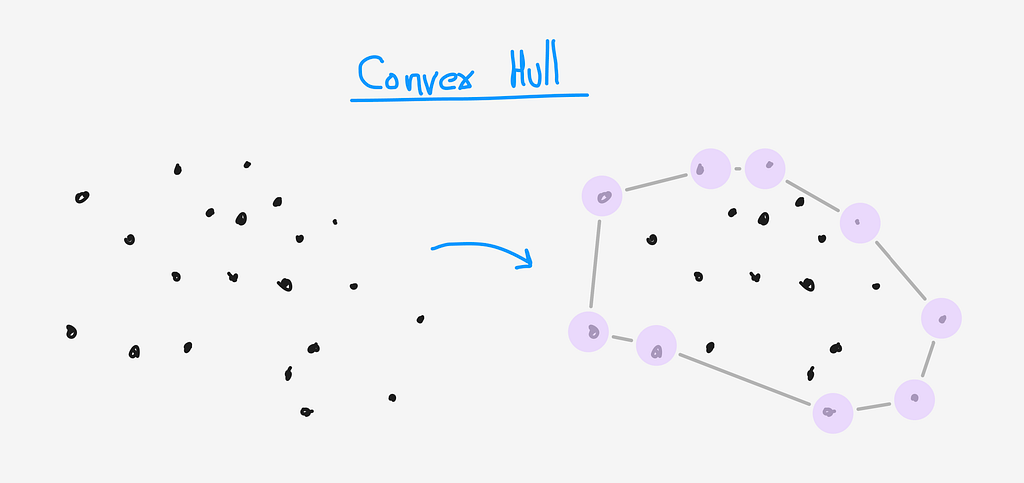
We pack the Convex Hull in a function we call getConvexHull(points), which accepts a set of points as parameter.
For our case we are using the Andrew’s Monotone Chain Algorithm, which is closely related to the Graham Scan and the Jarvis March algorithms explained here.
<a href="https://medium.com/media/81daa0c740690115489bd6d71cdcd0eb/href">https://medium.com/media/81daa0c740690115489bd6d71cdcd0eb/href</a>
Our Convex Hull Algorithm Implementation
```
function getConvexHull(points) { // Sort points by x-coordinate (and by y-coordinate as a tiebreaker) points.sort((a, b) => a.x === b.x ? a.y - b.y : a.x - b.x);
let hull = [];
// Build lower hull for (let p of points) { while (hull.length >= 2 && crossProduct(hull[hull.length - 2], hull[hull.length - 1], p) <= 0) { hull.pop(); } hull.push(p); }
// Build upper hull const lowerHullSize = hull.length; for (let i = points.length - 2; i >= 0; i--) { while (hull.length > lowerHullSize && crossProduct(hull[hull.length - 2], hull[hull.length - 1], points[i]) <= 0) { hull.pop(); } hull.push(points[i]); }
hull.pop(); // Remove duplicate last point return hull; }
// needed for the ConvexHull Calculation function crossProduct(a, b, c) { return (b.x - a.x) (c.y - a.y) - (b.y - a.y) (c.x - a.x); } ```
Drawing Edges Applying a Convex Hull Algorithm
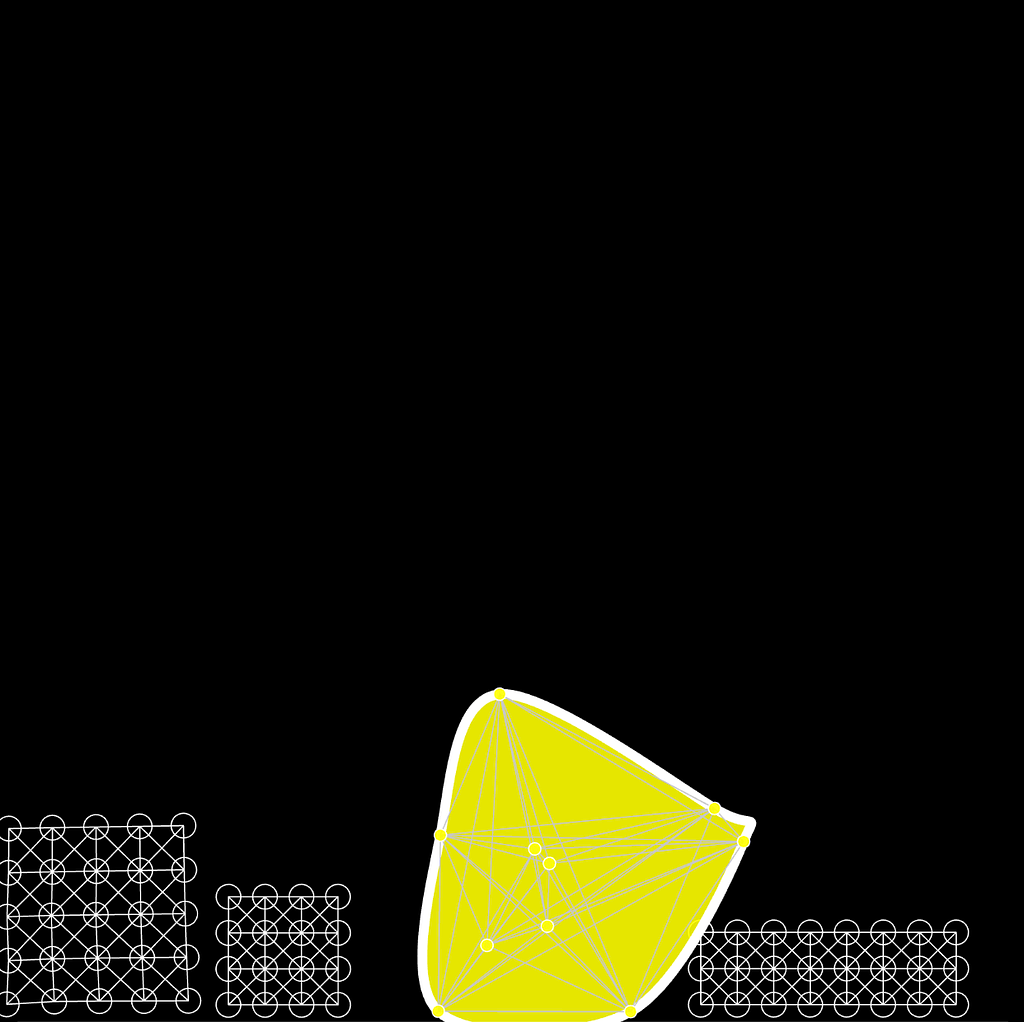
Great with the previous code we can write our draw function and display the Custom Shape Soft Body. Remember that we created a set of points or particles distributed randomly around a point in space. After we interconnected all these particles with a GLUE called constraints or springs, which are some invisible forces. Let’s visualise this:
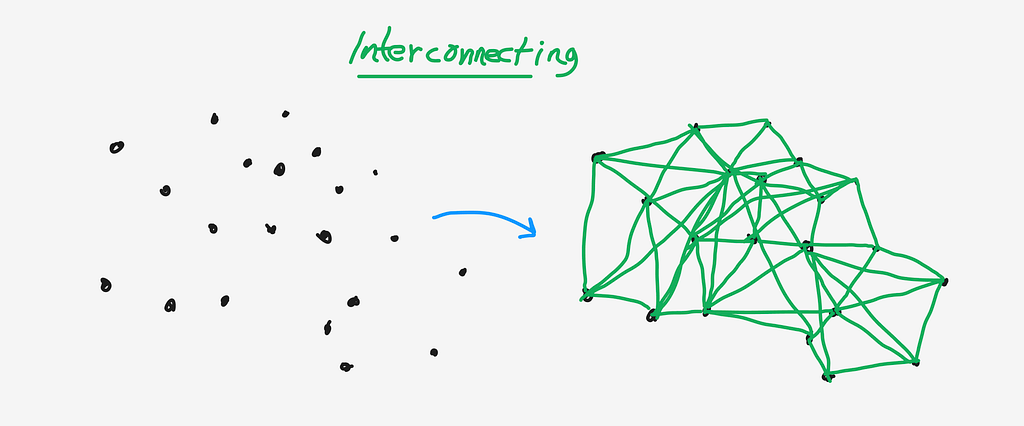
Now, all we need to do is iterate again through the particles or mass points and their glueing forces to determine ther continuous positions and use that information to visualize something. We will create a drawAmorphousSoftBody(amorphousBody, numSegments); function which accepts amorphousBody, and number of segments as parameter. Note that the 10 is given in case we forget to explicitely write this parameter while invoking the function.
We will use this function inside the draw() loop which is the main repeating function that allows p5js to dynamically display things on the screen, update variable and react to human interactions.
`` //... inside our draw() loop // Display the amorphous soft body drawAmorphousSoftBody(amorphousSoftBody,2); //... ``
Inside the drawAmorphousSoftBody function, we mainly need to do three things:
- extract the particle positions from the points in our amorphousBody
- get the convex hull out of those extracted particle positions
- visualize all the points from the amorphousBody and visualize the points and connecting contour from the ***hull*.**
```
// modified amorphous soft body function drawAmorphousSoftBody(amorphousBody,numSegments = 10) { let bodies = amorphousBody.bodies; let constraints = amorphousBody.constraints; // Extract particle positions let points = bodies.map(body => body.position);
// Get the convex hull of the points let hull = getConvexHull(points);
// Draw the convex hull as a connected shape stroke(255); // Red boundary strokeWeight(8); fill(255,255,0,230) beginShape(); // note: we are using a trick to draw the hull shape to avoid a pointy curve vertex // note reference : https://forum.processing.org/one/topic/sharp-corners-in-beginshape-with-curvevertex.html // Add the first two points at the beginning to improve smoothing curveVertex(hull[hull.length - 2].x, hull[hull.length - 2].y); curveVertex(hull[hull.length - 1].x, hull[hull.length - 1].y); // Draw the main points of the shape for (let point of hull) { curveVertex(point.x, point.y); } // Add the second and third points again to close the shape smoothly curveVertex(hull[0].x, hull[0].y); curveVertex(hull[1].x, hull[1].y); endShape(); // for drawing the inner connections stroke(200); strokeWeight(1); beginShape() for (let constraint of constraints) { let posA = constraint.bodyA.position; let posB = constraint.bodyB.position; vertex(posA.x,posA.y) vertex(posB.x,posB.y) //line(posA.x, posA.y, posB.x, posB.y); // Draw a line connecting two particles } endShape() // Optionally, draw all particles (comment out if not needed) stroke(255); strokeWeight(1); for (let body of bodies) { let pos = body.position; ellipse(pos.x, pos.y, body.circleRadius); // Draw particle as a circle } } ```
That’s it. We managed to create our amorphous shaped Soft Body, which is a mass-point-system joint by invisible spring forces.
Full Code
``` // written by ndr3svt from sooft.studio based on Daniel Shiffman's tutorials on matterjs // find more stuff like this on Instagram : // https://www.instagram.com/ndr3svt/ // https://www.instagram.com/sooft.studio/
// custom shape and edge with the convex hull algorithm
// Importing Matter.js modules // defines all elements from matter js engine let Engine = Matter.Engine, World = Matter.World, Bodies = Matter.Bodies, Composites = Matter.Composites, Mouse = Matter.Mouse, MouseConstraint = Matter.MouseConstraint; var mConstraint;
let engine, world; let softBodies = []; let boundaries = []; let cols = 5, rows = 5;
let amorphousSoftBody;
function setup() { var canvas = createCanvas(900, 900);
// Create Matter.js engine engine = Engine.create(); world = engine.world; // Run the engine Matter.Runner.run(engine);
// Create soft bodies let particleOptions = { friction: 0.15, frictionStatic: 0.91, render: { visible: true } };
// Add three soft bodies softBodies.push(createSoftBody(250, 100, cols, rows, 0, 0, true, 18, particleOptions)); softBodies.push(createSoftBody(400, 300, 8, 3, 0, 0, true, 15, particleOptions)); softBodies.push(createSoftBody(250, 400, 4, 4, 0, 0, true, 15, particleOptions));
// Add boundaries (walls) boundaries.push(Bodies.rectangle(450, 0, 800, 50, { isStatic: true })); // top boundaries.push(Bodies.rectangle(450, 900, 800, 50, { isStatic: true })); // bottom boundaries.push(Bodies.rectangle(900, 450, 50, 600, { isStatic: true })); boundaries.push(Bodies.rectangle(0, 450, 50, 600, { isStatic: true }));
// Add everything to the world for (let body of softBodies) World.add(world, body); for (let boundary of boundaries) World.add(world, boundary);
// adding an amorphous soft body //let particleOptions = { friction: 0.05, frictionStatic: 0.1, render: { visible: true } }; amorphousSoftBody = createAmorphousSoftBody(400, 300, 10, 50, 10, particleOptions); World.add(world, amorphousSoftBody);
// Add mouse control var canvasmouse = Mouse.create(canvas.elt); canvasmouse.pixelRatio = pixelDensity(); mConstraint = MouseConstraint.create(engine, { mouse: canvasmouse, constraint: { length: 25, stiffness: 0.12, angularStiffness: 0, render: { visible: true }, }, }); World.add(world, mConstraint);
}
function draw() { background(0);
// Draw soft bodies noFill(); stroke(255); strokeWeight(1);
for (let softBody of softBodies) { for (let body of softBody.bodies) { let pos = body.position; ellipse(pos.x, pos.y, 20, 20); // Draw each particle }
for (let constraint of softBody.constraints) { let { bodyA, bodyB, pointA, pointB } = constraint; let posA = bodyA ? bodyA.position : { x: pointA.x, y: pointA.y }; let posB = bodyB ? bodyB.position : { x: pointB.x, y: pointB.y };
line(posA.x, posA.y, posB.x, posB.y); // Draw connecting lines } }
// Display the amorphous soft body drawAmorphousSoftBody(amorphousSoftBody,2);
// Draw boundaries (walls) fill(100); for (let boundary of boundaries) { let vertices = boundary.vertices; beginShape(); for (let v of vertices) vertex(v.x, v.y); endShape(CLOSE); } }
// Helper function: create a soft body function createSoftBody(xx, yy, cols, rows, colGap, rowGap, crossBrace, radius, particleOptions) { let Common = Matter.Common;
particleOptions = Common.extend({ inertia: Infinity }, particleOptions); let constraintOptions = Common.extend({ stiffness: 0.05, render: { type: 'line', anchors: false } });
// Create stack of particles let softBody = Composites.stack(xx, yy, cols, rows, colGap, rowGap, function (x, y) { return Bodies.circle(x, y, radius, particleOptions); });
// Connect particles with constraints to form a mesh Composites.mesh(softBody, cols, rows, crossBrace, constraintOptions);
softBody.label = 'Soft Body'; return softBody; }
// Helper Function : create an amorphous soft body
function createAmorphousSoftBody(xx, yy, numParticles, areaRadius, radius, particleOptions) { let Composite = Matter.Composite; // Correct reference
// Create an empty composite for the amorphous body let amorphousBody = Matter.Composite.create({ label: 'Amorphous Soft Body' });
// Create particles randomly within the defined area let particles = []; for (let i = 0; i < numParticles; i++) { let angle = random(0, TWO_PI); // Random angle let distance = random(0, areaRadius*4); // Random distance within the area radius let x = xx + cos(angle) distance; let y = yy + sin(angle) distance;
let particle = Bodies.circle(x, y, radius, particleOptions); particles.push(particle); Composite.add(amorphousBody, particle); }
// Connect particles with constraints based on proximity for (let i = 0; i < particles.length; i++) { for (let j = i + 1; j < particles.length; j++) { let distance = dist( particles[i].position.x, particles[i].position.y, particles[j].position.x, particles[j].position.y );
//if (distance < radius * 8) { // Connect particles within a certain range let constraint = Matter.Constraint.create({ bodyA: particles[i], bodyB: particles[j], stiffness: 0.05, render: { type: 'line', anchors: false } }); Composite.add(amorphousBody, constraint); //} } }
return amorphousBody; }
// a function to detect the points inside a cluster and the points surrounding
function getConvexHull(points) { // Sort points by x-coordinate (and by y-coordinate as a tiebreaker) points.sort((a, b) => a.x === b.x ? a.y - b.y : a.x - b.x);
let hull = [];
// Build lower hull for (let p of points) { while (hull.length >= 2 && crossProduct(hull[hull.length - 2], hull[hull.length - 1], p) <= 0) { hull.pop(); } hull.push(p); }
// Build upper hull const lowerHullSize = hull.length; for (let i = points.length - 2; i >= 0; i--) { while (hull.length > lowerHullSize && crossProduct(hull[hull.length - 2], hull[hull.length - 1], points[i]) <= 0) { hull.pop(); } hull.push(points[i]); }
hull.pop(); // Remove duplicate last point return hull; }
// needed for the ConvexHull Calculation function crossProduct(a, b, c) { return (b.x - a.x) (c.y - a.y) - (b.y - a.y) (c.x - a.x); }
// modified amorphous soft body function drawAmorphousSoftBody(amorphousBody,numSegments = 10) { let bodies = amorphousBody.bodies; let constraints = amorphousBody.constraints; // Extract particle positions let points = bodies.map(body => body.position);
// Get the convex hull of the points let hull = getConvexHull(points);
// Draw the convex hull as a connected shape stroke(255); // Red boundary strokeWeight(8); fill(255,255,0,230) beginShape(); // note: we are using a trick to draw the hull shape to avoid a pointy curve vertex // note reference : https://forum.processing.org/one/topic/sharp-corners-in-beginshape-with-curvevertex.html // Add the first two points at the beginning to improve smoothing curveVertex(hull[hull.length - 2].x, hull[hull.length - 2].y); curveVertex(hull[hull.length - 1].x, hull[hull.length - 1].y); // Draw the main points of the shape for (let point of hull) { curveVertex(point.x, point.y); } // Add the second and third points again to close the shape smoothly curveVertex(hull[0].x, hull[0].y); curveVertex(hull[1].x, hull[1].y); endShape(); // for drawing the inner connections stroke(200); strokeWeight(1); beginShape() for (let constraint of constraints) { let posA = constraint.bodyA.position; let posB = constraint.bodyB.position; vertex(posA.x,posA.y) vertex(posB.x,posB.y) //line(posA.x, posA.y, posB.x, posB.y); // Draw a line connecting two particles } endShape() // Optionally, draw all particles (comment out if not needed) stroke(255); strokeWeight(1); for (let body of bodies) { let pos = body.position; ellipse(pos.x, pos.y, body.circleRadius); // Draw particle as a circle } } // unused part, starter to increase resolution of the edge points once determined to have harder physics boundaries around the amorphous shape :) function interpolatePoints(p1, p2, numSegments) { let interpolated = []; for (let i = 0; i <= numSegments; i++) { let t = i / numSegments; // Linear interpolation factor (0 to 1) let x = lerp(p1.x, p2.x, t); let y = lerp(p1.y, p2.y, t); interpolated.push({ x: x, y: y }); } return interpolated; } ```
Conclusion
I hope you enjoyed this article and the others in the series. Hopefully, you now have a broader understanding of what you can achieve with the principles of Soft Bodies and which libraries are already available for you to use. This is just the beginning of a journey. With custom shapes, you can now envision replacing the randomly generated point clusters with actual custom shapes, using their vectors as points to create interactive visuals and applications.
If you have any ideas but are struggling to implement them, don’t hesitate to reach out! You can contact me on Instagram — I’m quite responsive there.
For now, we’re wrapping up the topic of physics engines. Stay tuned! In the next articles, I’ll dive into exciting subjects like Interactivity, Software Infrastructures, SaaS Architectures, Applied Machine Learning in Production, Web Applications, and Native Applications for macOS.
Access the code at my github repository for playWithPhysics with this and more examples. (still a bit messy but it is work in progress).
Follow me, follow Sooft Studio, like this article and share it! It means a lot to us, and helps us to stay motivated to write more walk throughs like this.
Disclaimer: this examples and article were written in its entire majority by myself(Andres) and used LLMs (perplexity and gpt4o) for helping with the code when stuck. This time I didn’t use much the LLMs for correcting the style and grammar, so please bare with my errors.
References
- Code on the p5js editor: https://editor.p5js.org/ndr3svt/sketches/KuvxeM_LJ
- Convex Hull Algorithms https://www.youtube.com/watch?v=B2AJoQSZf4M
- Soft Body Dynamics https://en.wikipedia.org/wiki/Soft-body_dynamics
- How Soft Bodies Work https://www.youtube.com/watch?v=kyQP4t_wOGI
Originally published on Medium.